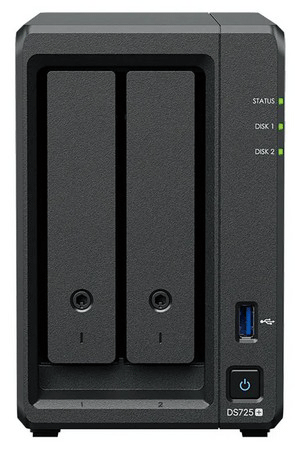
Synology DS725+
Normal Status Lights
Light
|
STATUS
|
Description & Suggested Action
|
| POWER | Flashing Blue | Powering On |
Flashing Blue | Shutting Down | Solid Blue | DSM not ready | Solid Blue | DSM is ready for use | Solid Blue | Hibernation | Solid Blue | Application | Unlit | Powered Off | | STATUS | Unlit | Powering On |
Solid Green | Shutting Down | Flashing Green | DSM not ready | Solid Green | DSM is ready for use | Unlit | Hibernation | Flashing Green/Orange | Application | Unlit | Powered Off | Unlit | Powering On | Off/Solid Orange | Shutting Down | Off/Flashing Orange | DSM not ready | Off/Solid Orange | DSM is ready for use | Off/Solid Orange | Hibernation | Flashing Green/Orange | Application | Unlit | Powered Off | | DRIVE STATUS | Solid Green | Drive ready and idle |
Flashing Green | Accessing Drive | Solid Orange | Locating Drive, Drive deactivated by user, port disabled, Drive health statis is critical or failing | Unlit | No internal drive |
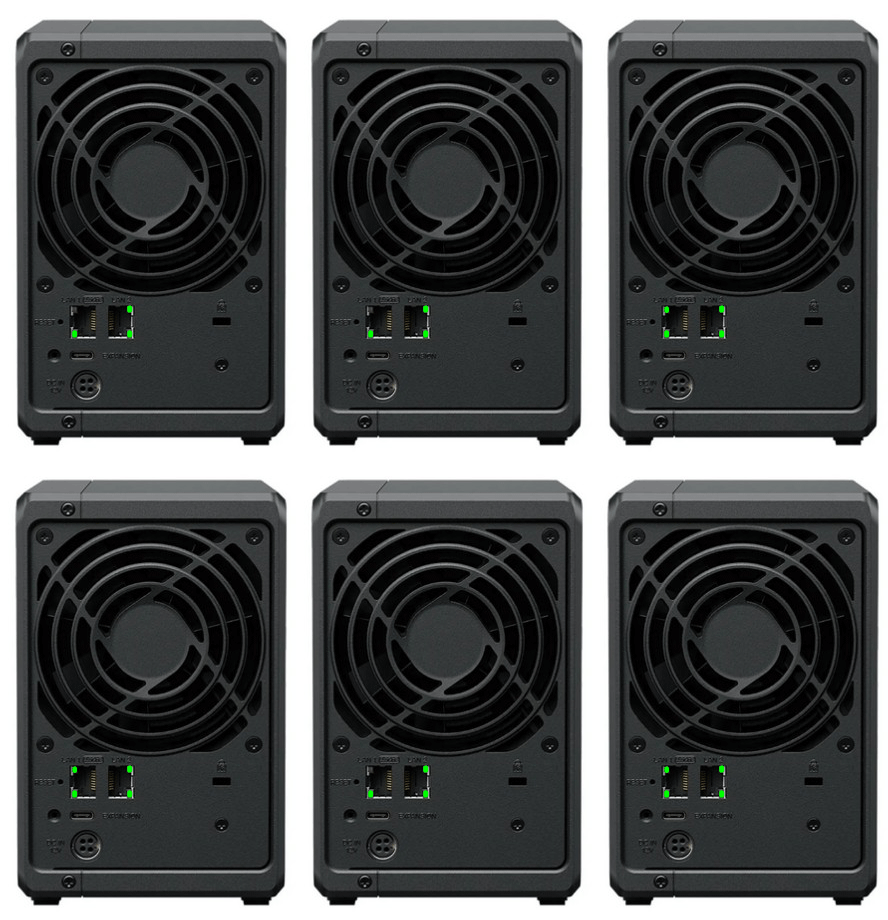
Light
|
STATUS
|
Description & Suggested Action
|
| 2.5 GbE LAN (Upper LED) | Solid Green | Network connected |
Flashing Green | Network active | Unlit | No Network | | 2.5 GbE LAN (Lower LED) | Solid Green | 2.5 Gbps connected |
Unlit | 1 Gbps/100 Mbps/10 Mbps or No network | | 1 GbE LAN (Upper LED) | Solid Green | Network connected |
Flashing Green | Network active | Unlit | No Network | | 1 GbE LAN (Lower LED) | Solid Green | 1 Gbps connected |
Unlit | 100 Mbps/10 Mbps or No network |
For more information or to have your device listed please contact
Infotel Systems
The Story Behind "Status Lights"

 StatusLights.com